The tool at a glance
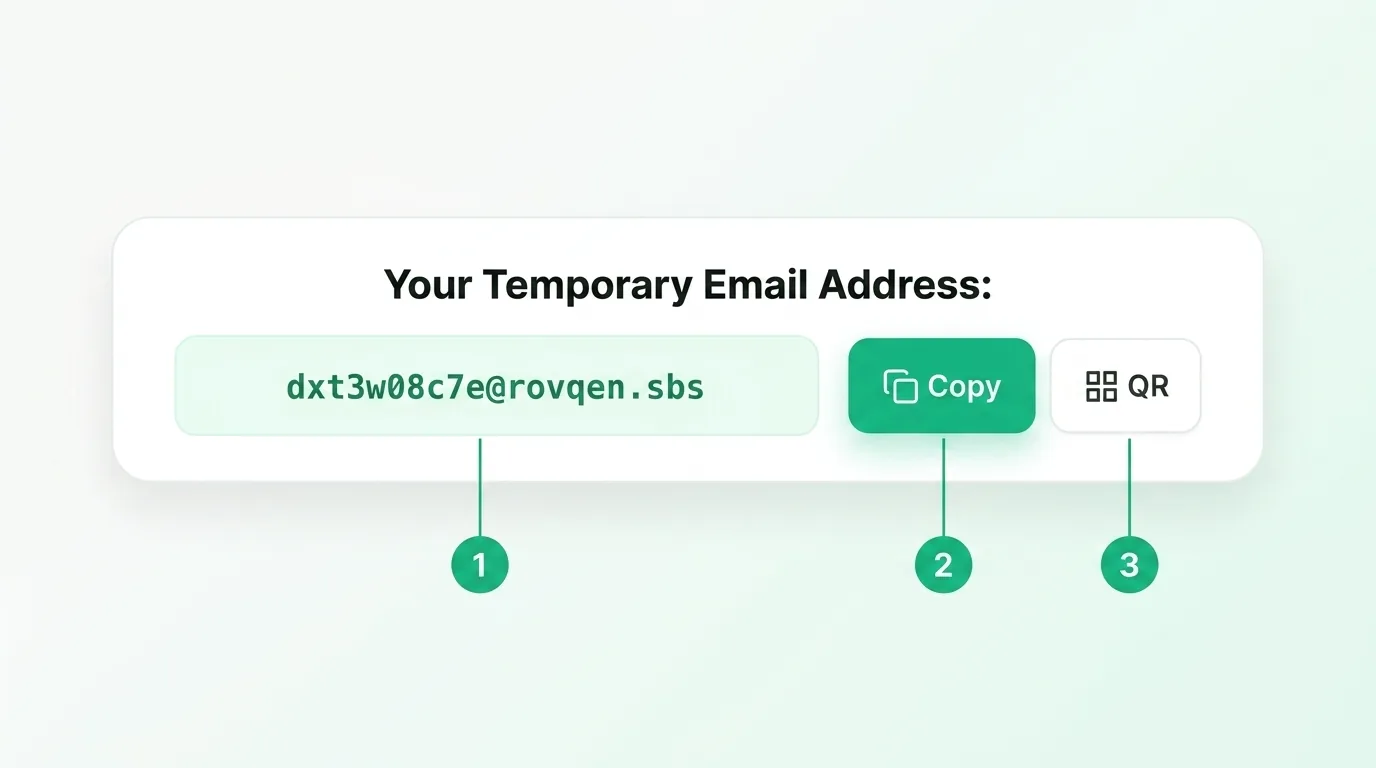
Everything you need sits in one small box at the top of the page. There is nothing to install and no account to make. You do not hand over your name, your phone number, or your real email. Here are the three parts you will use, marked 1, 2, and 3:
Step 1: Find your address
The green field marked 1 holds your temporary email address. It is made for you the second the page loads, so there is nothing to set up. Each visit gives you a fresh, random address that nobody else is using. Because it is not tied to your real name, it keeps your true inbox out of a company's mailing list. Want to know more about what this address really is? Read what a disposable email is.
Step 2: Copy it and paste it in
The green Copy button marked 2 puts the address on your clipboard in one tap. Now paste it into any sign-up form, download box, or newsletter field. The site sends its message, and it lands in the inbox on this page within seconds. You do not need to type the address by hand, so there is no risk of a typo that sends the code to the wrong place. Hit Refresh if it is slow. If a code never shows up, our troubleshooting guide walks through every fix.
Step 3: Use the QR code on your phone
The QR button marked 3 turns your address into a scannable code. This helps when you are signing up on your computer but want the inbox open on your phone. Scan it with your camera and your temporary inbox comes with you. It is a small touch that saves you retyping a long address by hand, and it means you can grab a code while you are away from your desk.
Why people reach for a throwaway address
Most sign-ups today ask for an email before they let you in. Some of those sites are fine, but others sell your address or fill your inbox with ads. A temporary address lets you get in, grab your code, and move on without giving up your real one. It is a simple way to cut down on spam before it ever starts. When the timer ends, the address and every message are gone, so there is nothing left to leak or resell later.
Common questions
Do I need to make an account?
No. There is no sign-up and no password. Open the page and your address is waiting.
Is it really free?
Yes, the whole tool is free to use, with no hidden cost and no card needed.
Can I get a new address?
Yes. Tap Change Email for a fresh one, or just reload the page. See all the tool features in one place.
Copy your address and go
Three parts, three seconds. Copy the address, paste it, and read your message, then let the inbox delete itself when the timer runs out. You choose how long it lasts, from 5 to 30 minutes, so a slow code still has time to arrive. Not sure a site will accept a throwaway address? See whether temp mail is safe first. Ready to try it? Grab a free temporary email and keep your real inbox clean.