Your inbox is right on the page
There is no separate app to open and no folder to hunt through. When someone emails your temporary address, the message appears in the list on the same page you are already looking at. Each row shows the sender, the subject, and a button to open it. Everything happens in your browser, so you can read your mail on a computer or a phone without downloading a thing.
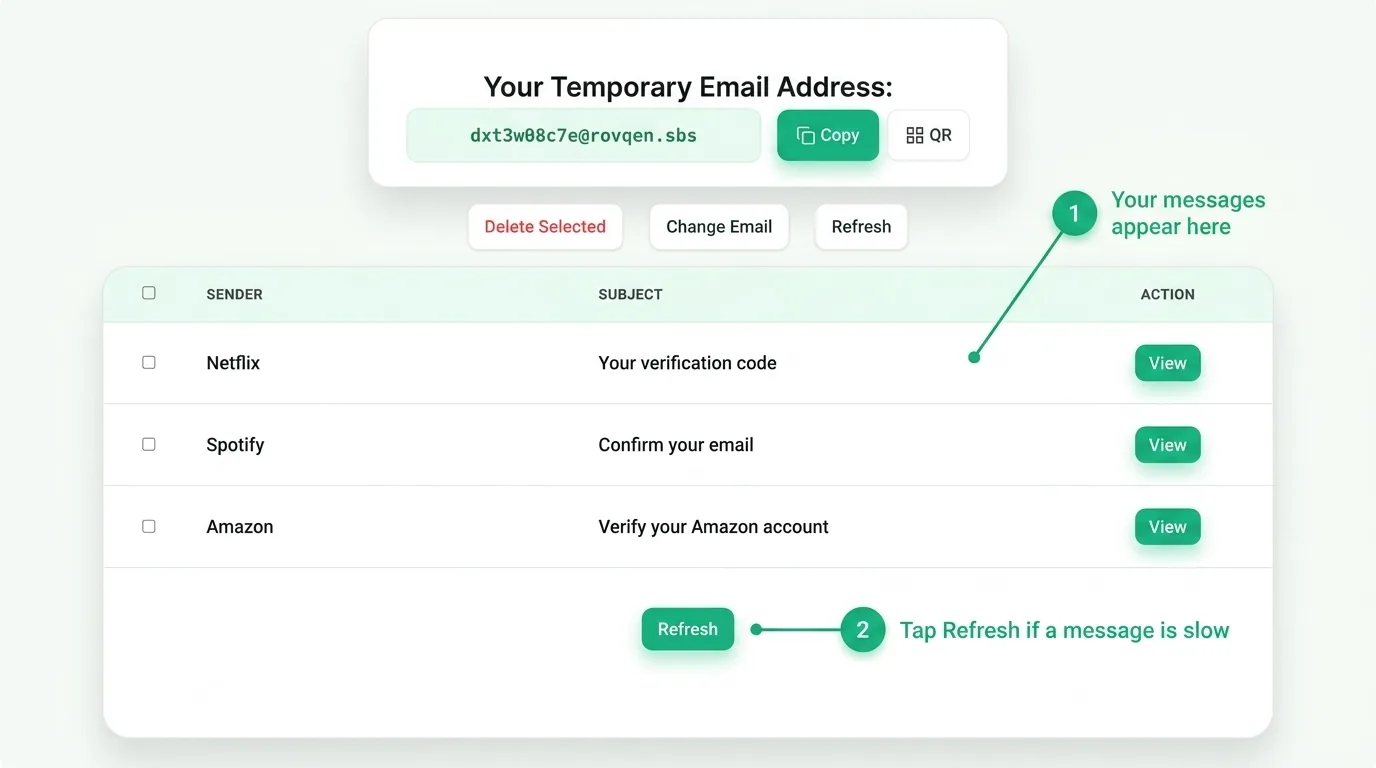
How to read a message
Opening a message takes one click.
- Watch the list for a new row to appear.
- Read the sender and subject to make sure it is the one you want.
- Click View in the Action column to open the full message and copy any code.
Most sign-up emails hold a short code or a confirm link. Once you have copied the code or clicked the link, you are done with that message and can move on.
If a message is slow
Most codes arrive in seconds, but some take a moment. Tap Refresh and wait a few seconds; the page also checks on its own every little while. A slow message is usually the sending site taking its time, not a problem on your end. If nothing ever shows up, our troubleshooting guide walks through every fix. You can also see all the tool features in one place.
What you can and cannot do here
This is a place to receive mail, not send it. You cannot reply from a temporary address, and that is on purpose, since it keeps the tool simple and safe. Use it to catch codes, confirm sign-ups, and read one-off messages. For anything you need to keep for a long time, use your real email instead. To understand the trade-off, read whether temp mail is safe for the job you have in mind.
What each message row tells you
Before you even open a message, the row gives you the two things that matter most. The sender tells you which site or service the mail came from, and the subject often holds the code right there in plain sight. Reading those two first saves you a click when you can already see what you need. If you signed up for more than one thing, this also helps you spot the right message fast, since the newest mail sits at the top of the list. A short wait is normal, so give the page a moment to list a new arrival.
Common questions
Where do my messages go?
Right into the list on this page. There is no other inbox or app to check.
Can other people see my mail?
Your address is random, so a stranger would have to guess it to send you anything. Still, treat a temporary inbox as public and never use it for private accounts.
How do I get a new address?
Tap Change Email or reload the page, and a fresh address is ready at once.
Knowing where your mail lands
Your inbox is short-lived on purpose. When the timer runs out, every message and the address are deleted for good, so nothing lingers. Now that you know exactly where each message shows up, you can copy any code you need before then, then grab a fresh inbox the next time you need one.